
Music Unlimited: A Guide to On-Demand Listening
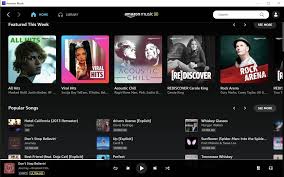
Music Unlimited is a name associated with subscription services that give listeners on-demand access to large collections of songs and albums. One well-known example is Amazon Music Unlimited, a paid music-streaming service from Amazon. Instead of purchasing each track individually, subscribers can browse a digital catalog and play music through supported apps and devices.
How It Works
Subscribers can search for artists, albums, playlists, and individual tracks, then stream what they want when they want. Depending on the plan, region, and device, features may include ad-free listening, offline downloads, personalized recommendations, and access to different audio formats. Music can be played through the service’s mobile and desktop apps, web player, and compatible connected devices.
Features to Consider
- On-demand playback: Choose specific songs and albums rather than relying only on radio-style playlists.
- Personalized discovery: Recommendations and curated playlists can help listeners find new music based on their tastes.
- Offline listening: Some subscription plans allow music to be downloaded for playback without an internet connection.
- Device compatibility: Support may include phones, computers, smart speakers, and other connected devices.
- Plan options: Individual, family, student, or device-specific plans may be available, depending on the service and location.
Is a Music Subscription Worth It?
A music-streaming subscription can be convenient for people who listen regularly and enjoy exploring a broad selection of music. It may also make it easier to create playlists, discover artists, and keep a personal library available across multiple devices. However, the catalog, features, and cost can vary, and access to streamed music generally depends on maintaining an active subscription.
Before signing up, compare the available plans, check whether the service works with your preferred devices, and review the current catalog and audio options. Pricing, trial offers, and features can change over time and may differ by country.
The Bottom Line
Music Unlimited services offer a flexible way to listen to a wide variety of music without buying every track separately. For frequent listeners, the combination of on-demand playback, playlists, and discovery tools may be appealing. The best choice depends on your budget, listening habits, preferred devices, and the features that matter most to you.
Maximize Your Music Unlimited Experience: 6 Essential Tips
- Download songs for offline listening.
- Create playlists for different moods.
- Explore personalized recommendations.
- Use voice commands to find music.
- Adjust streaming quality to save data.
- Check your plan’s device limits.
Download songs for offline listening.
Download songs for offline listening so your favorite music is available even when you don’t have an internet connection. With Music Unlimited, you can save eligible tracks, albums, or playlists in the app before traveling, commuting, or entering an area with limited service. Just remember to download music while connected to Wi-Fi, check that you have enough storage, and open the app periodically so your offline downloads remain available.
Create playlists for different moods.
Create playlists for different moods to make your listening experience more personal and convenient. Put together upbeat tracks for workouts, relaxing songs for quiet evenings, or favorite tunes for a long drive. With Music Unlimited, you can quickly find music to match the moment and return to your playlists whenever you need the right soundtrack.
Explore personalized recommendations.
Explore personalized recommendations to find music that fits your taste and discover artists you may not have heard before. As you listen to songs, albums, and playlists you enjoy, Music Unlimited can suggest similar tracks and curated mixes. Save the recommendations you like, and skip or rate those that don’t match your mood to help tailor future suggestions.
Use voice commands to find music.
Use voice commands to find music quickly and hands-free with Music Unlimited. Ask your compatible device to play a song, artist, album, genre, or playlist—for example, “Play jazz music” or “Play songs by Taylor Swift.” Voice search is especially handy when you’re cooking, driving, or relaxing, and it can help you discover music without typing.
Adjust streaming quality to save data.
Adjusting your streaming quality is an easy way to save mobile data while using Music Unlimited. Choose a lower audio-quality setting when listening over a cellular connection, especially if you stream for long periods, and switch to higher quality when connected to Wi-Fi. You can also download favorite songs or playlists over Wi-Fi for offline listening, helping reduce data use without giving up access to the music you love.
Check your plan’s device limits.
Check your plan’s device limits before streaming on multiple phones, computers, or speakers. Some Music Unlimited plans restrict how many devices can play music at the same time, even if you can install the app on several devices. Reviewing the plan details can help prevent playback interruptions and ensure everyone in your household can listen when they want.